Guide
Wedding hashtag ideas: how to create your own
By La Cabine Bretonne · published · updated
A wedding hashtag is only a handful of letters, yet it does a useful job: it gathers the photos your guests share on social media under one tag. Here’s how to build one from your names, check that it isn’t already taken, make it easy to read at a glance, and display it where guests will actually see it, starting with your wedding photo booth frame.
What is a wedding hashtag for?
On the night and in the days that follow, guests post their pictures: the ceremony, the drinks reception, the dance floor, their photo booth prints. Without a shared tag, those images stay scattered across dozens of accounts. A single hashtag lets you find them with one search, rather than chasing everyone to send you their photos.
It also ties your stationery together, appearing on the invitation, the welcome sign and every print guests take home. Bear in mind that a search only shows what each person’s privacy settings allow, so some posts from private accounts won’t appear for you. If you want every picture, offer a shared album as well.
Five ways to come up with your hashtag
Start with what feels like you, then combine two elements at most. The examples below use made-up names, so swap in your own.
- Your first names, the clearest starting point: #EmmaAndJames or #JamesAndEmma, whichever sounds better out loud.
- Your surname, if you’re sharing one or fancy a playful nod: #TheHartsSayIDo, #MeetTheFletchers.
- A pun, if one comes naturally: Olivia and Tom Hart might go for #HappilyEverHart. Don’t force it, though; a joke that needs explaining will be mistyped.
- The date, to set you apart from another couple with the same names: #EmmaAndJames2027 or #EmmaJamesJune2027. Put the numbers at the end rather than the start.
- The venue or region: #EmmaAndJamesInCornwall, #WedByTheSea. Handy if the setting is part of your story.
Check the hashtag isn’t already taken
Before it goes on anything printed, type your idea into the search bar of every social network your friends and family use. If photos already show up, especially from someone else’s wedding, your pictures would end up mixed with theirs. Add a date, an initial or a place, then search again.
Try the close variations too: with or without ‘And’, names the other way round, surname on its own. A guest in a hurry will sometimes type whatever comes to mind first, so that version should be clear as well. Do this early, before the invitations go out, since the hashtag will be printed on them.
Make it easy to read at a glance
A hashtag gets a split second on a sign or at the bottom of a print. A few simple rules prevent typos and duplicates.
- Capitalise the first letter of each word: #EmmaAndJames is far easier to read than #emmaandjames. On most networks searches ignore capitals, so they’re there purely to help people read it.
- Leave out accents. Depending on the keyboard and the app, #ZoëAndRené and #ZoeAndRene can become two separate tags, splitting your photos in half.
- No spaces, hyphens, apostrophes or full stops: the hashtag stops at the first one. Mary-Kate and Joe become #MaryKateAndJoe.
- Watch out for letters that look alike. In #IslaAndLiam, a capital I and a lower-case l are hard to tell apart in many typefaces, and the same goes for O and zero. Pick a nickname, your surname or another phrase instead.
- Keep it short. Beyond four or five words, a hashtag becomes hard to remember and to copy correctly. If you have to read it twice to understand it, simplify.
Wedding hashtag ideas to borrow
Here are some patterns to adapt, again with made-up names. Keep the structure, change the names, then check the result is unused.
- #EmmaAndJames2027, the classic names-and-year formula.
- #SophieTiesTheKnot, when one of you wants the spotlight.
- #HappilyEverHart, for a surname that lends itself to wordplay.
- #FinallyTheFletchers, for a couple taking the same name.
- #ChloeAndSamInYorkshire, with the region thrown in.
- #TheWeddingOfEmmaAndJames, more formal, suited to classic stationery.
- #OliviaSaidYesToTom, the proposal story in one line.
Read each one aloud: if it rolls off the tongue, your guests will remember it.
Where to display your wedding photo booth hashtag
The earlier guests see the hashtag, the more they’ll use it. Announce it on the save the date or invitation, or even at your engagement party, then repeat it on the day: welcome sign, table plan, menus, table cards, guest book.
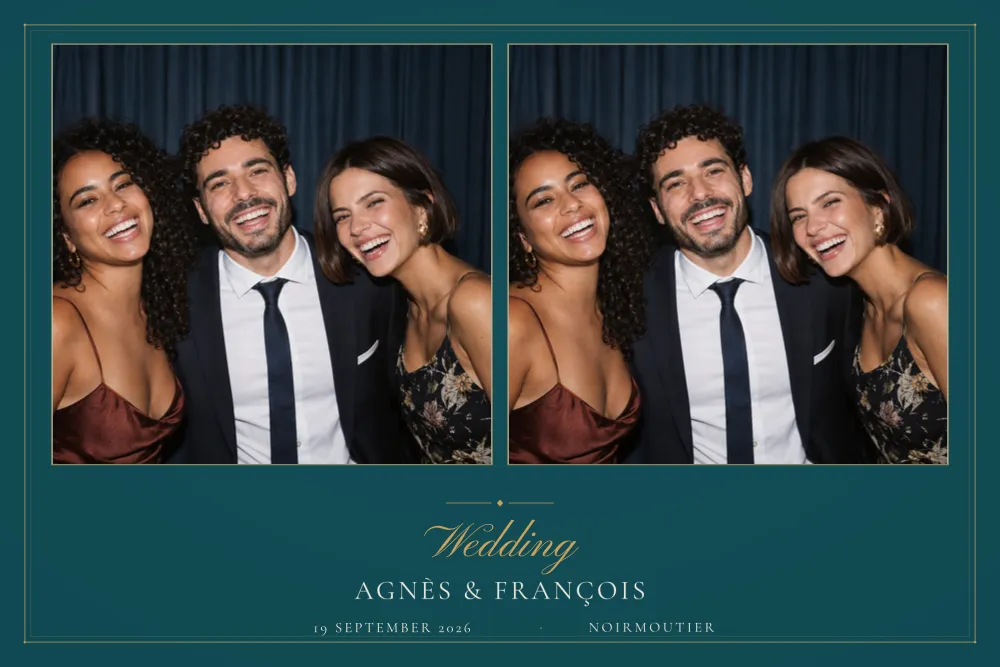
The photo booth frame is a particularly effective spot, because every guest leaves with a print that carries it. A guest who snaps their print to share it has the hashtag right in front of them at the perfect moment. With a 2×6 photo strip, the dslrBooth package places the strip twice on a 4×6 sheet: one for the guest, one for the guest book, both showing the hashtag. For the rest of the wording, our guide to wedding photo booth frame wording has plenty of suggestions.
Adding the hashtag to your frame in the editor
Pick a design with room for a line of text. Fine Capitals shows nothing but your names in widely spaced capitals, so a hashtag sits there quietly. White Signature gathers your names, date and venue in a clean white margin, while Deep Teal & Gold sets the date and venue beneath the photos. You’ll find more understated options in the minimalist wedding collection.
Then open the editor, for example customise White Signature. If the design has a line for a hashtag, type yours in; otherwise use the venue or message line. The site flags any text that’s too long for its space: shorten it, or resize the area to make it bigger. You can also move it and change the colour of that one line to make it stand out or blend in. Keep it a few millimetres from the edges, as the cut can drift. Your draft is saved automatically on your device.
When you download, you get a 300 DPI PNG overlay, transparent where the photos go, ready for dslrBooth or any software that accepts a PNG overlay. Spotted a typo in the hashtag afterwards? Fix it from My account and your files are updated; you can also share a link to them with your photo booth supplier. Our guide to customising a photo booth template walks through every setting.